If you logged into your dashboard recently and noticed a prompt for WordPress 7.0.1, you might be wondering if an urgent action is required. Released on July 9, 2026, WordPress 7.0.1 is a short-cycle maintenance release designed to polish the foundational changes introduced in the massive WordPress 7.0 “Armstrong” launch. Unlike major version rollouts, this minor release strictly addresses 31 bugs across Core and the Block Editor, alongside minor adjustments for PHP 8.5 compatibility.
Because WordPress deploys automatic background updates for minor versions by default, there is a strong chance your site has already securely updated itself. In this breakdown, we will show you how to verify your current version, detail exactly what changed in the Block Editor and core code, and help you determine if any manual action is required to keep your site running smoothly.
This post tells you exactly what WordPress 7.0.1 fixes, which bugs matter for security, and how to update without breaking your site.
What Is WordPress 7.0.1? And Why It Matters
WordPress 7.0.1 is a maintenance release. That means the core development team built it specifically to clean up bugs left over from the major 7.0 release cycle, rather than to patch freshly discovered security vulnerabilities. Released on July 9, 2026, it fixes 31 documented bugs across core WordPress and the Gutenberg block editor..
Here is the thing: “maintenance release” does not mean “optional.” WordPress 7.0 had a rough launch. The team originally planned it for April 9, 2026. It shipped six weeks late on May 20 after a critical flaw in the real-time collaboration system forced them to rebuild a database table from scratch. That same collaboration feature got cut from the release entirely. With that kind of launch pressure, cleanup bugs were always coming.
The Team Behind the Release
To ensure stability, the WordPress 7.0.1 release team was led by core veterans:
- Core Leads: Aaron Jorbin & Carlos Bravo
- Editor Lead: Estela Rueda
- Release Tester: Brian Haas
Backed by over 80 community contributors, this team focused entirely on platform stabilization.
The Bug That Actually Affects Security: Ticket 63085
Most of the 31 fixes in 7.0.1 address visual glitches and editor quirks. But one fix has a direct security angle.
Ticket 63085 fixes a bug where WordPress sends login detail spam from the account registration page. Think about what that means for your site. A visitor registers for an account. WordPress sends them a confirmation email. Good. But under the conditions this bug creates, WordPress can send unexpected credential emails to unintended recipients or fire off spammy account messages that look like they come from your domain.
This creates two real problems. First, your email reputation takes a hit. Spam complaints from real users push your domain toward blacklists, which means future legitimate emails from your site land in spam folders. Second, an attacker who prods your registration form can learn things about your user accounts from how your site responds to certain inputs. Security researchers call this “information disclosure.” It is a stepping stone to a more targeted attack.
Does this affect your site? Go to Settings, then General, in your WordPress dashboard. Look for the checkbox that says “Anyone can register.” If someone checked that box, this bug can touch your site. WooCommerce stores, membership sites, and learning management systems almost always allow registration. If your site falls into any of those categories, this fix alone makes the update worth doing today.
The CSS Bug That Can Break Your Site’s Design: Ticket 65270
Here is where it gets serious. The WordPress team introduced this bug themselves in the final release candidate of WordPress 7.0, just before launch.
The wp_kses() function in WordPress core sanitizes HTML and CSS to remove unsafe code. That is its job, and it does it well. But in 7.0 RC4, someone introduced a flaw that caused the function to corrupt a completely valid CSS declaration: background-image: url().
When wp_kses() processes that CSS, it breaks it. The result looks like this: style=")". WordPress strips out the image URL and leaves only a stray closing parenthesis. Any element on your site that uses a CSS background image through inline styles can lose its background entirely after you update to WordPress 7.0.
Think about how many things use background images. Page builders use them for section backgrounds. Themes use them for hero images. Sliders, banners, and call-to-action blocks use them constantly. This bug sits quietly in 7.0 and waits to corrupt your layout. WordPress 7.0.1 fixes it.
If you updated to 7.0 and noticed any sections suddenly showing plain backgrounds where images used to be, this was the cause. The 7.0.1 update will restore your layouts, but you may need to re-save any affected pages to force WordPress to regenerate the clean CSS.
All 31 Fixes: What the Core Team Addressed
Let us go through every category of fix in this release so you know exactly what changed.
Security and Account Management
WordPress core team fixed the login detail spam issue from the registration page. Sites with open registration should treat this as a priority fix.
PHP 8.5 Compatibility
The team fixed incorrect array access in wp_get_attachment_image_src. This function runs on almost every WordPress site that displays images in any form. PHP 8.5 handles array access differently than older versions, and without this fix, sites that upgrade their server to PHP 8.5 will encounter errors on image-heavy pages. WordPress 7.0.1 prepares you for that transition now, before it becomes urgent.
Block Editor and Gutenberg Fixes
The development team resolved several foundational issues within the Gutenberg editing experience:
Controlled Mode Glitches: Fixed a problem where controlled block changes flagged posts as having “unsaved changes” even when no changes occurred.
CSS Corruption Bug: Resolved the critical wp_kses() background-image filtering issue detailed above.
Inline CSS Lockout: Fixed an ongoing bug since the 7.0 launch that prevented users from removing global-styles-inline-css.
Block Visibility Exploits: Fixed an issue where “hide everywhere” conditions failed if a block opted out of visibility support.
Stale Codebase Files: Cleaned up the Gutenberg asset workflow where deleted contributor files were persisting unexpectedly.
Admin UI Regressions
WordPress 7.0 shipped a redesigned admin interface. With new designs come new bugs. The team fixed these visual regressions in 7.0.1: the image editor showed a size mismatch between scale and crop inputs, form elements in the mobile viewport were not standardized under the admin reskin, the Media Library’s loading spinner was misaligned in the filter toolbar, the major publishing action buttons were crowded together in the Publish panel, the Media Library search bar shifted position after you ran a search, the network credit page header showed a broken logo, and the Scale button on the Edit Image screen was not aligned correctly with the dimension inputs.
One of those, ticket 65286, had a hotfix plugin available from May 28 if you could not wait. You no longer need that plugin. The fix is in core.
Accessibility
The Visual History feature had accessibility issues that prevented keyboard and screen reader users from navigating it properly. The team fixed this in both core (ticket 65122) and Gutenberg (pull requests 77530 and 78393), adding CSS outline as a non-color indicator for diff blocks in the revisions view.
The team also fixed a missing aria-label on the lightbox trigger button for image blocks. This label matters because screen readers announce the button to visually impaired users. Without it, the button is invisible to assistive technology.
Navigation and Block Infrastructure
The team restored block_core_navigation_submenu_render_submenu_icon() as a deprecated function shim. WordPress 7.0 removed this function, which broke any theme or plugin that called it directly. Navigation menus on affected sites showed blank areas where submenu icons should have appeared. The 7.0.1 fix restores the function so that existing code keeps working while developers update their own code over time.
The team also fixed a problem where navigation block renders were dirtying related entities, which caused excessive database writes and false “unsaved changes” states. On high-traffic sites with frequent page loads, this created unnecessary database activity.
Other Core Fixes
Emoji rendering: WordPress was incorrectly replacing certain characters with Twemoji images when it should not have. The emoji detection script was also not printing in the admin area at all.
The team improved the browserslist:update Grunt task for developers who build WordPress locally. They also fixed the global-styles-inline-css filter registration issue that prevented developers from removing those styles since 7.0 launched. The Block Visibility controls now correctly support the “keep hide everywhere working” behavior after a block opts out of visibility support.
How 7.0.1 Connects to the Bigger 7.0 Security Story
WordPress 7.0.1 does not introduce any new CVE patches. But it ships on top of a 7.0 release that already included ten security fixes from the chaotic 6.9.2 through 6.9.4 patch cycle. If you update from an older version directly to 7.0.1, you get all of those fixes too.
Here is a quick summary of what WordPress 7.0 already fixed before 7.0.1 arrived:
A blind SSRF (server-side request forgery) in WordPress core let attackers send requests from your server to internal network resources. Stored cross-site scripting vulnerabilities in nav menus and the data-wp-bind directive let authenticated attackers inject JavaScript into your admin pages. CVE-2026-3907 patched a PclZip path traversal that let a malicious ZIP file write code outside the intended directory during archive extraction. CVE-2026-3906 fixed an authorization bypass on the Notes feature that let lower-privileged users perform actions reserved for higher roles. CVE-2026-3908 patched XXE injection in the getID3 media library, which processes audio and video file metadata and could expose server-side files in a successful attack.
Three of those ten patches were incomplete in 6.9.2 and 6.9.3. Only 6.9.4 and 7.0 contained fully applied versions of the three CVEs listed above. If you have been running 6.9.2 or 6.9.3 without updating, your site has incomplete patches. WordPress 7.0.1 contains all of them, fully applied.
Check Your PHP Version Before You Do Anything Else
WordPress 7.0.1 requires PHP 7.4 as the minimum version. But here is what that number does not tell you: PHP 7.4 reached end-of-life in November 2022. Running PHP 7.4 in July 2026 means running a version with years of unpatched vulnerabilities at the language level. Those vulnerabilities exist completely apart from anything WordPress does.
The WordPress core team recommends PHP 8.3 or higher. That is not a soft suggestion. PHP 8.3 gives you current security patches, faster execution, and access to modern WordPress APIs.
Check your PHP version right now. Go to your WordPress dashboard, click Tools, then click Site Health, then click the Info tab. Find the Server section and expand it. Your PHP version appears there. No plugin required.
If you see any version below 8.0, call your host before you touch anything else. Ask them to upgrade your PHP. Most managed WordPress hosts can do this with a single click. If you see 7.2 or 7.3, know that WordPress 7.0.1 will not install on those versions at all. You will also lose access to all future WordPress security releases until you upgrade PHP. This is a hard cutoff, not a soft warning.
How to Update to WordPress 7.0.1
WordPress 7.0.1 is already live. You can update right now using any of these three methods.
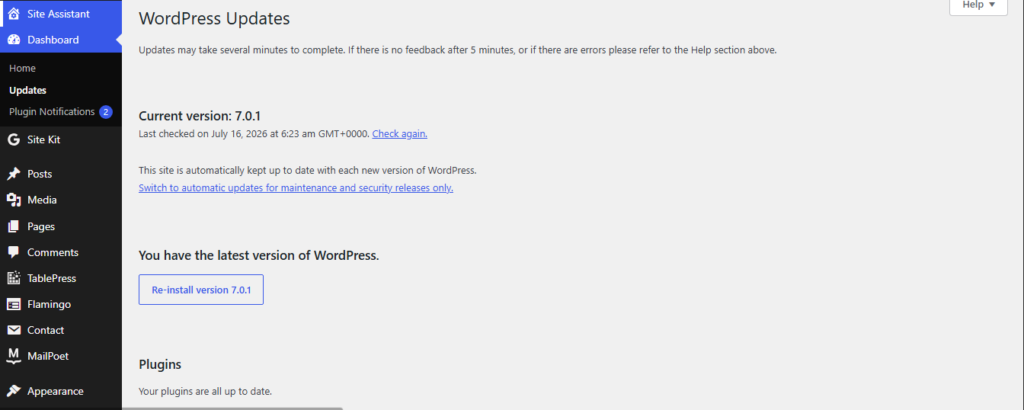
Through the dashboard: Go to Dashboard, then Updates. You will see WordPress 7.0.1 listed. Click “Update Now.” WordPress handles everything automatically.
Through WP-CLI: Run wp core update followed by wp core verify-checksums. The second command compares your core files against WordPress.org’s known-good file checksums. Run it after every core update to confirm no files were altered during the update process.
Direct download: Visit wordpress.org/wordpress-7.0.1.zip and download the package manually. Use this method if your hosting environment restricts automatic updates.
If you have sites that support automatic background updates, WordPress may have already applied this update to your site. Check your update history in Dashboard, then Updates, then View update history.
Your Update Checklist: Do This Before and After
Let us be honest: most WordPress sites break because site owners skip the pre-update steps. Work through this list and you will avoid the most common problems.
Before you update:
Check your PHP version at Tools, then Site Health, then Info, then Server. Your target is 8.3 or higher.
Take a complete backup of both your files and your database. “My host backs up automatically” is not a recovery plan unless you have tested restoring from that backup. Know that you can actually restore.
Test the update on a staging environment first. This matters most if you use block editor plugins, WooCommerce, a page builder, or a custom theme. Gutenberg-related plugins are especially likely to have compatibility issues after major core updates.
Confirm that your critical plugins have declared compatibility with WordPress 7.0 or higher. Check each plugin’s changelog page or its listing on the WordPress plugin directory.
If you have the hotfix plugin for ticket 65286 installed, you can remove it after updating. The fix is now in core.
After you update:
Verify your PHP version again in Site Health after the update completes. Confirm it did not change unexpectedly.
Check that your two-factor authentication plugin is still active. Security plugins have a higher rate of post-update conflicts than most other plugin categories.
Visit several frontend pages and check that CSS background images still appear. The wp_kses() fix should resolve the corruption, but you may need to re-save any pages where images disappeared in WordPress 7.0. Open those pages in the editor and click Update without making any changes. WordPress will regenerate the styles.
If you use navigation menus with submenus, spot-check them on the frontend. The restored block_core_navigation_submenu_render_submenu_icon() function should bring back any submenu icons that disappeared in 7.0.
Run a malware scan. Major updates sometimes clear file-modification monitoring caches, which makes this a good moment to baseline your file integrity state.
What WordPress 7.0.1 Still Does Not Fix
Keeping up with core updates is essential. But you should know exactly where core leaves you exposed so you can fill those gaps with the right tools.
WordPress still has no native two-factor authentication. Every WordPress site that handles user accounts, payments, or sensitive content needs two-factor authentication. It is not in core. It requires a plugin. WP 2FA by Melapress provides both standard two-factor codes and passkey support in its free tier. Install it if you have not already.
WordPress still has no native web application firewall. A WAF blocks malicious traffic before it reaches your site. WordPress does not include one. You need either a security plugin like Wordfence, which runs a firewall inside PHP, or a cloud-based service like Cloudflare or Sucuri that filters traffic before it touches your server. The cloud-based approach is stronger because it stops bad requests before they reach your hosting environment at all.
Plugin vulnerabilities still drive most attacks. Here is the number that matters: roughly 90% of WordPress compromises start in a plugin or theme, not in core. The WordPress security team patched eleven thousand plugin vulnerabilities in 2025. Core patches keep your foundation clean. But your plugins need just as much attention, and the WordPress team does not patch those for you.
Keep automatic updates turned on for plugins you trust. Check the WordPress vulnerability databases regularly. Subscribe to security alerts that tell you when plugins you use get new CVEs.
WordPress 7.0.1 at a Glance
| Detail | Information |
|---|---|
| Release date | July 9, 2026 |
| Release type | Maintenance release |
| Total bug fixes | 31 |
| Security-relevant tickets | Ticket 63085 (login spam) |
| PHP minimum | 7.4 (PHP 8.3 recommended) |
| Next major release | WordPress 7.1, August 19, 2026 at WordCamp US |
| New CVEs patched | None in 7.0.1 |
| Auto-updates | Active for sites with background updates enabled |
FAQ: WordPress 7.0.1 Maintenance Release
Q: What does WordPress 7.0.1 fix?
WordPress 7.0.1 fixes 31 bugs from the 7.0 release cycle. The fixes cover a login spam vulnerability in the registration flow (ticket 63085), a CSS corruption bug that breaks background images in inline styles (ticket 65270), a PHP 8.5 compatibility error in wp_get_attachment_image_src (ticket 64742), multiple admin interface regressions in the redesigned dashboard, block editor stability issues, and 15 Gutenberg pull requests covering navigation blocks, accessibility, and editor behavior. The WordPress team released this version on July 9, 2026.
Q: Is WordPress 7.0.1 a security release?
WordPress 7.0.1 is a maintenance release, not a dedicated security release, and it does not patch new CVEs. However, ticket 63085 fixes a login spam issue with real security implications for any site that allows public user registration, including WooCommerce stores and membership sites. The team also fixed a CSS sanitization bug in wp_kses() that could affect security plugin interfaces that use inline CSS.
Q: Do I need to update from WordPress 7.0 to 7.0.1?
Yes. The WordPress team treats all minor releases as required updates, not optional ones. Ticket 63085 affects any site with open user registration. Ticket 65270 can silently break CSS background images across your site. Both issues have been present in every version of WordPress 7.0 since launch. Updating to 7.0.1 resolves both. The process takes a few minutes through your WordPress dashboard.
Q: What PHP version does WordPress 7.0.1 require?
WordPress 7.0.1 requires PHP 7.4 at minimum, but the WordPress core team recommends PHP 8.3 or higher. PHP 7.4 reached end-of-life in November 2022, which means it receives no security patches from the PHP team. Sites running PHP 7.4 in 2026 carry unpatched PHP-level vulnerabilities that exist independently of WordPress. Check your PHP version at Tools, then Site Health, then Info, then Server in your WordPress dashboard.
Q: What comes after WordPress 7.0.1?
The next major WordPress release is WordPress 7.1, and the team plans to launch it on August 19, 2026 at WordCamp US. In the meantime, the core team will open the 7.0.2 milestone for any tickets that do not make the 7.0.1 cutoff, so you can expect another minor maintenance release before 7.1 arrives. The team currently develops WordPress 7.1 in active alpha builds.
Sources
- WordPress 7.0.1 Maintenance Release — WordPress.org
- WordPress 7.0.1 RC1 Announcement — Make WordPress Core
- WordPress 7.0.1 Release Schedule — Make WordPress Core
- WordPress 7.0 Security Features: What’s New, What Got Fixed, and What Got Cut — WP Secure Stack
The WP Secure Stack team covers WordPress security vulnerabilities, plugin alerts, and hardening guides for site owners who want to stay ahead of threats without needing a computer science degree. New CVEs and plugin alerts go out every Tuesday. Subscribe free at wpsecurestack.com.



Leave a Reply